
How to Fix Tech Neck Pain: 7 Steps
Table of Contents
- What Is Tech Neck and Why It Happens
- Recognize the Symptoms of Tech Neck
- Step 1: Correct Your Workstation Setup with Ergonomic Desk Setup Tips
- Step 2: Perform Daily Tech Neck Exercises
- Step 3: Apply Heat and Cold Therapy
- Step 4: Choose the Right Cervical Pillow for Neck Pain
- Step 5: Adjust Your Sleep Position
- Step 6: Take Regular Breaks and Practice Posture Awareness
- Step 7: Know When to Seek Professional Help
- Long-Term Recovery and Prevention
- Frequently Asked Questions
Last Updated: September 30, 2026
What Is Tech Neck and Why It Happens
Tech neck is the forward head posture and neck strain that develops from spending hours hunched over phones, tablets, and computer screens, and learning how to fix tech neck pain requires addressing both your daily habits and sleep position. Your head tilts forward, pulling your cervical spine out of alignment. Over time, this creates tension in your neck, shoulders, and upper back.

When you look down at a device, your head's weight increases the load on your neck muscles. At 15 degrees forward tilt, your neck feels 27 pounds of pressure; at 45 degrees, that jumps to 49 pounds. Your trapezius and other stabilizers work overtime, leading to fatigue and pain.
Eight hours of this posture contracts your muscles, decreases blood flow, and builds inflammation. By evening your neck is stiff; by morning you wake sore. Many people blame their pillow, but the real issue started at the desk.
Recognize the Symptoms of Tech Neck
Knowing what to look for helps you catch tech neck early, before it becomes chronic. Common signs include:
- Persistent neck stiffness, especially after work
- Sharp or dull pain in your neck and upper back
- Tension headaches that start at the base of your skull
- Shoulder tightness that doesn't ease with rest
- Reduced range of motion when turning your head
- Pain that worsens throughout the day as you use devices
Some people notice radiating pain down their arms or numbness in their fingers, suggesting nerve compression. If pain peaks after work but improves with rest, device usage is the culprit. If it persists all day and night or wakes you from sleep, seek professional evaluation (Step 7).
Step 1: Correct Your Workstation Setup with Ergonomic Desk Setup Tips
Your workstation is ground zero for tech neck prevention. Most people position screens too low and too far away. Correct setup varies by device: laptop, desktop, tablet, and smartphone each require different solutions.
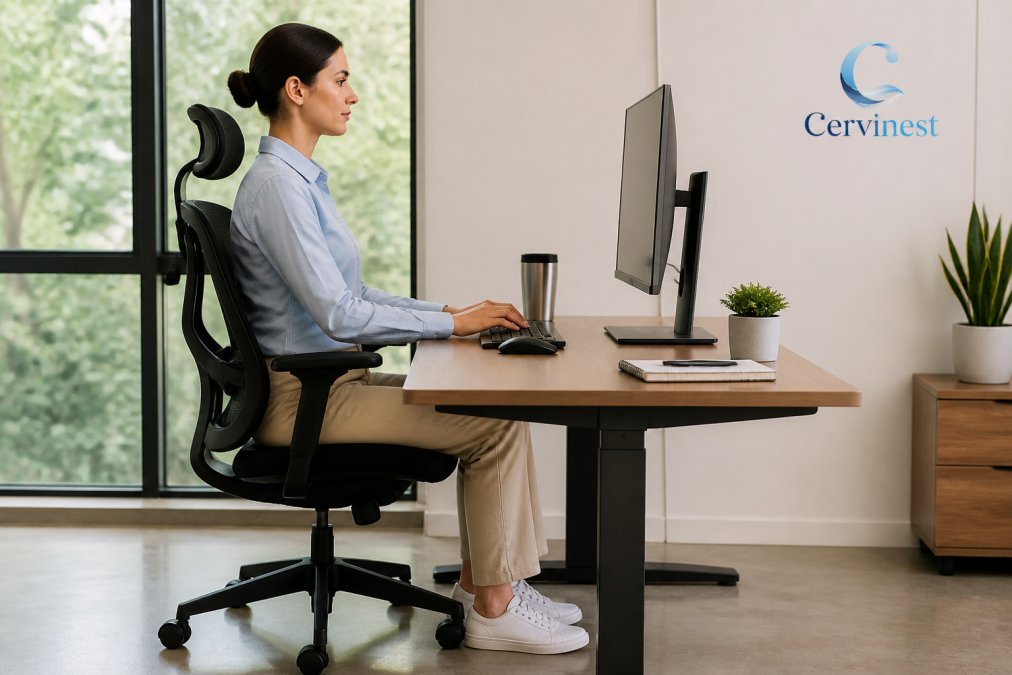
Universal ergonomic principles:
Universal ergonomic principles:
- Eye level rule: Eyes should meet the top third of your screen when sitting upright. This keeps your cervical spine neutral.
- Distance rule: Screen should be 20-26 inches from your eyes (arm's length). Closer distances cause forward lean; farther distances cause neck craning.
- Arm positioning: Elbows at 90 degrees when hands are on keyboard or mouse. Wrists neutral.
- Feet and chair: Feet flat on floor with knees at 90 degrees. Chair supports lower back curve. Use a footrest if feet dangle.
Desktop setup (monitor + separate keyboard + mouse):
This is the easiest setup to optimize:
- Position monitor top at or slightly below eye level
- Measure 20-26 inches from eyes to screen
- Place keyboard and mouse at elbow height
- Adjust chair so thighs are parallel to floor
- Use a monitor stand ($0-$30) or footrest ($20-$50) if needed
This 10-minute setup helps fix tech neck pain and prevents months of recurring discomfort.
Laptop setup (the most common source of tech neck):
Laptop setup (the most common source of tech neck):
Laptops are ergonomic disasters because the screen and keyboard are attached. Separate them:
- Elevate your laptop on a stand so the screen is at eye level ($15-$50)
- Connect an external keyboard and mouse ($30-$100)
- Position keyboard and mouse at elbow height
- Sit 20-26 inches from the screen
This under-$100 setup transforms your posture and prevents months of neck pain. For travel, use a portable stand with a wireless keyboard.
Tablet setup (often overlooked):
Tablets create unique challenges: held in your lap forces your head down; on a desk without a stand requires forward lean.
- Use a tablet stand at eye level ($20-$50)
- Connect a Bluetooth keyboard at elbow height if typing
- Position stand so neck is neutral
- Sit 20-26 inches from screen
- Take breaks every 20 minutes
Tablet users often underestimate daily usage time. A stand prevents sustained forward head posture.
Smartphone setup (the hardest to optimize):
Smartphones are the most common source of tech neck. Minimize damage:
- Hold phone at eye level, not in lap or at chest height
- Use voice-to-text to reduce downward head tilt time
- Set a 20-minute timer, then look away for 20 seconds
- Use a phone stand for extended viewing
- Keep font size large so you read at arm's length
3-4 hours of daily phone use with your head tilted 30 degrees forward creates the same cumulative strain as 8 hours at a poorly positioned desk.
Workstation audit checklist:
Before exercises or new pillows, audit your workstation:
- Screen top at or below eye level?
- 20-26 inches from screen?
- Elbows at 90 degrees on keyboard?
- Feet flat on floor or footrest?
- Lower back supported?
- Laptop elevated with external keyboard?
- Tablet on stand at eye level?
- Phone at eye level?
Fix setup issues first, poor ergonomics override good habits. Optimizing costs $50-$200, less than two weeks of pain medication or one therapy session, and prevents recurring pain for years.
Step 2: Perform Daily Tech Neck Exercises
Stretching and strengthening exercises counteract the forward head posture that builds throughout your day. These moves take 10 minutes total and work best when done twice daily, morning and evening.
Chin Tuck Exercise
The chin tuck is the single most effective exercise for correcting forward head posture. It activates the deep cervical muscles that hold your head in proper alignment.
Here's how to do it:
- Sit or stand with your shoulders relaxed
- Keep your eyes forward (don't look down)
- Gently draw your chin straight back, as if making a double chin
- Hold for 5 seconds
- Release and repeat 10 times
Do this three times per day. You'll feel muscles working at the base of your skull. That's the right sensation. If your neck hurts, you're pulling too hard, ease off.
Scapular Retraction
Your shoulder blades (scapulae) are connected to your neck through muscle chains. Retracting them relieves tension in your trapezius and upper back.
The movement:
- Sit upright with arms at your sides
- Squeeze your shoulder blades together as if pinching a pencil between them
- Hold for 5 seconds
- Release and repeat 15 times
This exercise counters the forward slouch that comes with device use. Do it every two hours if you're at a desk all day.
Neck Stretches
Gentle stretching improves range of motion and reduces muscle tension. Perform each stretch slowly, no bouncing.
Lateral neck stretch:
- Sit upright
- Tilt your right ear toward your right shoulder
- Hold for 20-30 seconds
- Repeat on the left side
- Do three sets per side
Posterior neck stretch:
- Sit upright
- Clasp your hands behind your head
- Gently pull your chin toward your chest
- Hold for 20-30 seconds
- Do three sets
These stretches address the specific muscle groups stressed by tech neck. Consistency matters more than intensity. Gentle daily stretching beats aggressive occasional stretching.
Step 3: Apply Heat and Cold Therapy
Heat and cold reduce inflammation and muscle tension through different mechanisms. Many people benefit from using both strategically.
When to use heat: After exercise, for chronic stiffness, or before bed. Apply for 15-20 minutes at medium. Moist heat penetrates deeper than dry heat.
When to use cold: Immediately after acute injury or flare-up, or for acute pain. Use an ice pack wrapped in cloth for 10-15 minutes. Never apply ice directly to skin.
Alternate therapy: cold for the first 48 hours after a flare-up, then switch to heat for maintenance.
Step 4: Choose the Right Cervical Pillow for Neck Pain
Your pillow matters more than most people realize. A proper cervical pillow cradles your head for natural alignment and fills the gap between your neck and mattress, where standard pillows fail by compressing under your head's weight.
What to look for:
- Contoured design supporting your cervical spine's natural curve
- Medium firmness (soft pillows compress; hard pillows create pressure points)
- Height matching your shoulder width
- Durable materials that don't degrade quickly
- Breathability to prevent overheating
At Cervinest, we design pillows to support your neck and head for more natural alignment. The Orthopedic Pillow for Neck Pain ($51.99) provides ergonomic cervical alignment and relieves morning soreness and stiffness. The Neck Support Pillow for Pain Relief ($104.99) is designed to melt neck tension and relieve morning pain while combating tech neck strain from your day.

If you want customizable support, the Cervical Neck Pillow with Water Base ($59.99) features a built-in water chamber that lets you add or remove water to match your comfort level. It adapts to your movement throughout the night to help your neck muscles relax while maintaining natural curvature.
Expect to spend 3-5 nights adjusting to a new cervical pillow. Your neck has adapted to poor support. A proper pillow feels different at first, that's normal. Give it a week before deciding.
Step 5: Adjust Your Sleep Position
Your sleep position is not a secondary concern, it is a primary determinant of whether your daytime improvements stick or unravel overnight. You spend 6-8 hours in one position. If that position strains your cervical spine, you undo the progress you make during waking hours.
Why sleep position matters for tech neck recovery:
When you sleep, your muscles relax and your spine loses active support. A misaligned sleep position compresses discs, stretches ligaments, and maintains the forward head posture you're trying to reverse. Stomach sleeping is the worst position, it forces your cervical spine to rotate 90 degrees for 6-8 hours, twisting your head to one side and creating asymmetrical load. This habit alone may prevent recovery.
Back sleeping (optimal for tech neck recovery):
- Lie flat on your back with shoulders relaxed
- Place one pillow under your head (not two, which recreates forward head posture)
- Pillow should support your cervical spine's natural curve; head should feel cradled, not elevated
- Place a small pillow or rolled towel under your knees to reduce lower back strain
- You should fit one finger (not a fist) in the gap between your neck and pillow
Back sleeping distributes your head's weight evenly and keeps your cervical spine neutral. It feels unnatural for 3-5 nights before becoming comfortable.
Side sleeping (acceptable alternative):
- Lie on your side with your entire spine in a straight line
- Pillow height is critical: it should fill the gap between shoulder and neck so your head aligns with your spine
- A contoured cervical pillow is often necessary for side sleepers
- Place a pillow between your knees to keep hips aligned
- Alternate sides every few nights to prevent asymmetrical muscle tension
Side sleeping requires more precision with pillow selection. A pillow too low leaves your cervical spine bent sideways; too high creates compression. Side sleepers often benefit most from a contoured cervical pillow with adjustable height.
Transitioning from stomach sleeping:
If you've been a stomach sleeper for years, your body resists change. Don't try to switch cold turkey; you'll wake up frustrated and return to your old habit. Instead:
- Weeks 1-2: Sleep on your back for three nights, then return to your preferred position for two nights. This gradual exposure helps your nervous system adapt.
- Weeks 3-4: Increase back sleeping to four nights per week. Your neck muscles will begin to relax in the new position.
- Weeks 5+: Aim for back sleeping five nights per week, with one or two nights of side sleeping as a transition.
This 4-6 week transition prevents the discomfort that causes people to abandon the change.
The pillow-position interaction:
Your pillow choice and sleep position are inseparable. A back sleeper needs a pillow with a gentle contour that supports the cervical curve without over-elevating the head. A side sleeper needs a pillow tall enough to fill the shoulder-to-neck gap. A stomach sleeper (if you must) needs a very thin pillow or no pillow to minimize cervical rotation, but this position should be temporary during your transition.
Many people buy a "cervical pillow" but choose the wrong height or firmness for their sleep position. If you're switching positions, test your pillow in the new position before committing to it. Lie in your new sleep position for 10 minutes in a store or return-friendly retailer. Your neck will tell you immediately if the pillow is right.
Sleep position and pain timeline:
If you've been sleeping in a position that aggravates tech neck, you may notice pain relief within 3-5 nights of switching to a neutral position. However, if you've slept poorly for months, your cervical muscles are deconditioned and inflamed. Expect 2-3 weeks of consistent proper sleep positioning before you feel a significant reduction in morning stiffness. This is normal. Your muscles are healing.
If you wake up with the same pain after two weeks of correct sleep positioning, your daytime posture or workstation setup likely needs adjustment. Sleep position alone cannot overcome eight hours of forward head posture at a desk.
Step 6: Take Regular Breaks and Practice Posture Awareness
You can't fix tech neck by treating it only at night. You have to interrupt the behavior that causes it during the day.
The 20-20-20 rule: Every 20 minutes, look at something 20 feet away for 20 seconds. This gives your eye muscles and neck muscles a break. It also naturally pulls your attention away from the screen, interrupting the forward head posture cycle.
Set a timer if you have to. Most people are shocked at how quickly 20 minutes passes when they're focused on work.
Beyond the timer, practice posture checks throughout your day:
- Every hour, pull your shoulders back and reset your chin tuck
- Stand and stretch for two minutes between tasks
- Walk to get water or coffee instead of having it delivered to your desk
- Take lunch away from your desk, ideally outside
These micro-breaks cost almost nothing and prevent the accumulation of tension that becomes chronic pain.
Step 7: Know When to Seek Professional Help
Some neck pain requires professional evaluation. If you experience any of these, schedule an appointment with a healthcare provider:
- Pain that persists for more than two weeks despite home treatment
- Radiating pain or numbness down your arm or into your fingers
- Weakness in your hands or arms
- Headaches that accompany neck pain
- Pain that wakes you from sleep consistently
- Any trauma or injury to your neck
A physical therapist can assess your posture, identify muscle imbalances, and design a treatment plan specific to your situation. They may recommend manual therapy, targeted exercises, or other interventions beyond what home care can provide.
Your primary care doctor can rule out serious conditions like cervical spine damage or nerve compression. Imaging (X-ray or MRI) may be necessary if conservative treatment isn't working.
Don't wait months hoping the pain resolves on its own. Early intervention prevents chronic pain from developing.
Long-Term Recovery and Prevention
Fixing tech neck is a process, not a one-time fix. Most people see improvement within two to three weeks of consistent effort. Real recovery, where your neck feels strong and pain-free, typically takes six to eight weeks.
The timeline depends on how long you've had the problem. If you've had tech neck for six months, recovery takes longer than if you caught it after six weeks. But the process is the same: correct your posture, do your exercises, support your spine at night, and take breaks during the day.
After you've recovered, prevention becomes your focus. This doesn't mean you stop using devices. It means you stay aware of your posture and catch yourself before you slip back into old habits.
Keep your workstation optimized. Keep doing your stretches, even if just three times per week. Sleep on a supportive pillow. Take your breaks.
The Cervinest Pillow for Neck and Shoulder Pain ($94.99) helps relieve neck and shoulder tension while supporting natural alignment. Its contoured cervical design is made to comfortably support both side and back sleepers with consistent support throughout the night.

Your neck will thank you for the investment in proper support and daily care.
Frequently Asked Questions
What are the most common symptoms of tech neck?
Tech neck typically causes neck stiffness, shoulder tension, and pain at the base of the skull. Many people experience tension headaches, limited range of motion, and muscle fatigue in the trapezius and upper back. Symptoms often worsen throughout the day and may persist into sleep, making it difficult to find a comfortable position. If pain is severe or accompanied by numbness, consult a healthcare provider.
How long does it take to fix tech neck pain?
Many people notice improvement over several weeks with consistent stretching, ergonomic adjustments, and proper sleep support. Chronic cases often take longer to resolve, depending on severity and how long the poor posture persisted. Using a cervical pillow for neck pain alongside daily exercises and workstation changes can support your overall comfort. Patience and consistency matter more than speed.
Can a pillow alone fix tech neck pain?
A pillow helps, but it's most effective as part of a complete approach. A cervical pillow for neck pain supports natural spinal alignment during sleep and helps reduce morning stiffness, but daytime posture, ergonomic setup, and stretching address the root cause. Tech neck develops from prolonged forward head posture during the day, so addressing it requires both nighttime support and daytime habit changes.
What's the difference between heat and ice for tech neck pain?
Use heat for stiffness and muscle tension, it can increase blood flow and relax tight muscles. Apply a heating pad for 15-20 minutes. Use ice for acute inflammation or sharp pain, it can help reduce swelling and numb discomfort. Apply a cold compress for 10-15 minutes. Some people find alternating between heat and ice helpful. If pain persists beyond a few days, seek medical advice.
Tech neck doesn't resolve itself. It gets worse without intervention. But with the seven steps in this guide, workstation fixes, daily exercises, proper sleep support, and professional help when needed, you can eliminate the pain and prevent it from returning. Start with your workstation setup today. Add one exercise tomorrow. Get a supportive pillow this week. Small changes compound into real relief.